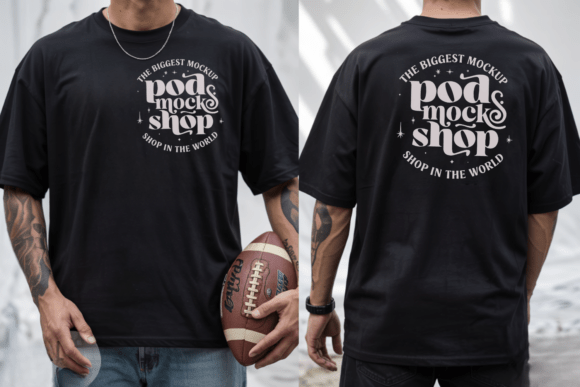
Elevate Your Brand with the Gildan 5000 Black Front & Back Mockup
When you’re building a brand or launching a new line of apparel, the visual presentation of your designs is everything. A great idea on paper needs a professional context to truly shine. This is where a high-quality mockup becomes an indispensable tool in your creative arsenal. The Gildan 5000 Black Front & Back Mockup is designed to do exactly that—provide a clean, versatile, and professional canvas for your artwork, logos, and typography. It’s more than just a blank t-shirt; it’s a foundational piece for your brand identity and marketing materials.
Understanding the Visual Appeal of the Gildan 5000
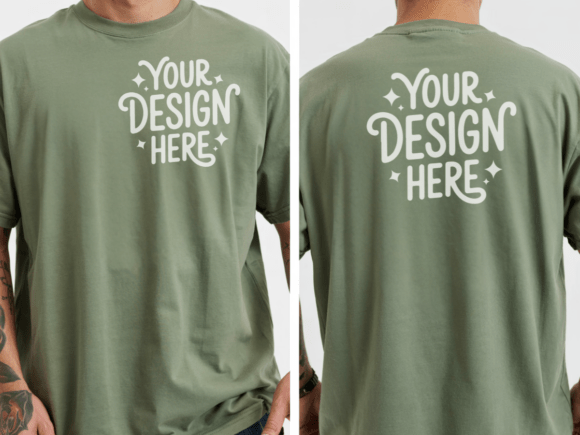
The Gildan 5000, also known as the G500, is a staple in the world of blank apparel. Its popularity stems from its reliable fit, consistent quality, and classic crewneck silhouette. This particular mockup captures the essence of that shirt in a crisp, high-resolution JPEG file. The black colorway offers a bold, modern backdrop that makes designs pop with contrast. It’s a style that works across countless aesthetics—from minimalist streetwear and boho vibes to sharp corporate branding and graphic-heavy merchandise.
The "front and back" aspect is crucial for comprehensive presentations. It allows you to showcase a primary chest design on the front and a more intricate or secondary design, like a back print or label detail, on the rear. This gives clients or your audience a complete view of the product, which is essential for e-commerce listings, social media previews, and portfolio pieces. The mockup’s clean, personable look helps create that minimalistic vibe, letting your design be the undisputed hero of the image.
Practical Applications for Designers and Entrepreneurs
This mockup is a versatile design asset with applications far beyond simple t-shirt design. For the entrepreneur, it’s perfect for creating mockups for online store listings on platforms like Etsy or Shopify. You can place your logo or artwork on the shirt to give customers a realistic preview of the final product, which builds trust and can reduce return rates.
For graphic designers and agencies, it’s a powerful tool for client presentations. Instead of just showing a flat graphic, you can present a logo design or typography concept as it would appear on real merchandise. This contextualizes the work and helps clients visualize the end result. It’s equally valuable for packaging design projects where apparel might be part of a larger product suite, or for creating compelling visuals for social media graphics and digital ad campaigns.
The mockup’s high resolution (300 DPI) ensures it’s suitable for both digital and print use. You can create sharp, detailed images for websites, blogs, and email newsletters, or use them in printed lookbooks and marketing collateral without losing quality. For content creators and bloggers, featuring designs on a professional mockup can significantly elevate the perceived value of their content and any merchandise they promote.
Key Features and Licensing for Commercial Use
Let’s break down the specifics of what you get. The download is a clean JPEG file with no watermarks, tags, or distracting text. This means you can use it immediately in your projects. The 300 DPI resolution is the industry standard for print-quality images, ensuring your visuals look sharp everywhere.
Understanding the licensing is critical for any commercial font or asset. The terms for this mockup are straightforward and favorable for business use:
- Personal and Commercial Use: You are free to use this image for both personal projects and commercial endeavors. This includes creating product listings, marketing materials, client presentations, and portfolio showcases.
- Restrictions: You may not resell, share, or edit the original mockup file itself. The goal is to use it as a foundation for your own unique designs, not to redistribute the base template. You cannot, for example, sell the blank mockup as a standalone product.
This licensing model is ideal for small business owners and freelancers. It provides the freedom to use the asset extensively in your workflow without worrying about complex usage rights, as long as you’re using it to display your own creative work.
Integrating the Mockup into Your Design Workflow
Getting the most out of the Gildan 5000 mockup involves a bit of strategic thinking. First, consider your project’s aesthetic. The black shirt pairs exceptionally well with light-colored designs, vibrant hues, and metallic effects. It can also create a sophisticated, subdued look with dark grey or charcoal artwork for a tone-on-tone effect.
Think about font pairing if your design includes text. A bold, clean sans serif font might work perfectly for a modern streetwear look, while an elegant script font could suit a bohemian or feminine brand. Use the mockup to test how different typeface combinations interact with the shirt’s texture and folds. This is where you evaluate not just the design, but its readability and visual hierarchy on a real-world object.
Finally, use the front and back views to tell a story. The front can capture attention with a strong logo or graphic, while the back can provide additional information, a clever tagline, or a more detailed illustration. This two-sided approach is a hallmark of professional apparel design and adds depth to your presentation. By incorporating the Gildan 5000 Black Front & Back Mockup into your process, you’re not just displaying a design—you’re showcasing a complete, market-ready product idea.